THE NURAMARK FIELD GUIDE

Complex markets.
A clearer next step.

Try an idea. Read the signal. Choose how to act.
Get to know NuraMark, one small step at a time.

✦ Interactive walkthroughFive simple chaptersNo trading experience needed
01 / YOUR PRACTICE SPACE

Try it before you choose it.

Replay past signals with a virtual budget. Compare tickers, explore results, and build your shortlist.

  1. Pick a market and your tickers

    Compare a few tickers using the same period and budget.

  2. Set a budget. Run the replay.

    Replay past signals. Check the ending balance, fees, and ups and downs.

  3. Compare, then save your favorites

    Check losses as well as returns. Save your shortlist as favorites in Markets.

Open the real simulator ↗
REAL NURAMARK PANELPortfolio simulator

Your picks. Your budget.
The real simulator.

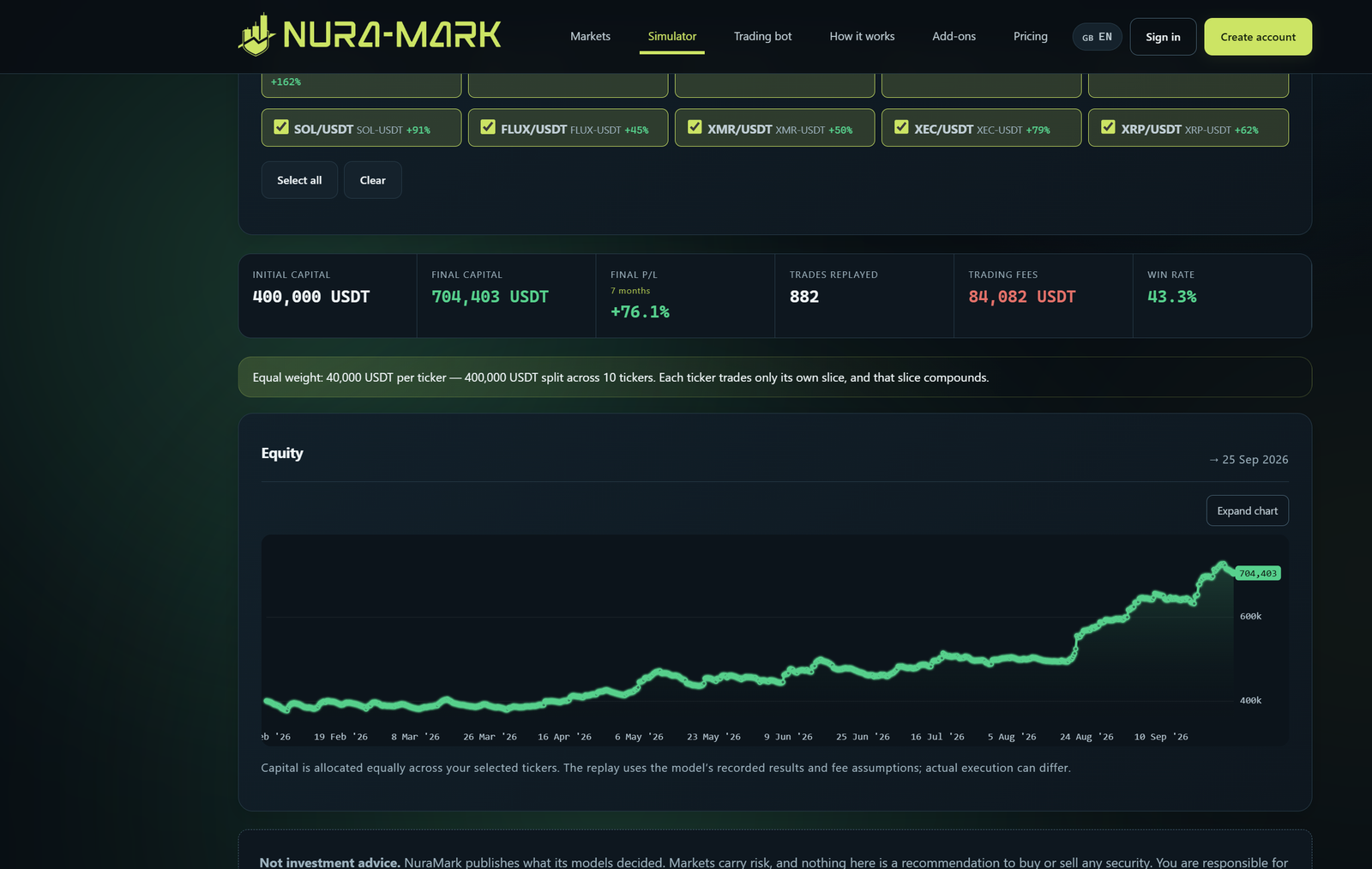
Choose tickers, adjust your budget, and replay real signals in the panel below.

Uses your account access. Saving here updates your simulator settings.

Preview the simulator layout ↗
Saved NuraMark simulator panel
Saved interface capture. Open the working panel above for the current data. Saved interface capture; labels inside this image are in English.
02 / ONE CARD, ONE CLEAR PICTURE

Read the signal in layers.

Start with the action. Check its time. Then read the size and the record.

LATEST PUBLISHED CARDRefresh ↻

Same card as Markets. Open an explanation to highlight its matching area.

PHA/USDT
PHA-USDT
Sold 🚑 Stop loss
Last 24 sessions
Signal now SELL SL
0.0466 USDT +3.10%
Win rate44.4% Model return +320.7% / 9 months Trades9

AI recommendation: 💡 Next candle is expected to trade below today's low (58% likely).

Technical analysis: 18% of past bars that looked like this marked a local bottom — 5.6× the usual 3%. climactic red volume spike · macro RCI bottomed · selling exhausted.

Published 2h Full performance →
01What is it doing?

The badge shows buy, hold, sell, or out. Hold keeps a position; out means no position. Neither tells you to buy.

02When was the decision made?

Check the candle time and interval. The close is a reference price, not a live quote or a guaranteed fill.

03How do the ladder steps work?

The fraction shows completed steps in the plan. Follow the current order; do not repeat completed steps after refreshing.

04How much is the order?

Read the order quantity and value. Check your budget, balance, and exchange minimums.

05What does the record tell me?

Check each date range. Win rate counts winning trades; return measures value gained or lost. Past results are not a promise.

06What does max buy or sell mean?

It is an order-size limit, not a spending target. Open the signal to see its chart and timing guidance.

Explore signal cards ↗
03 / YOUR SIGNALS, FOLLOWED AUTOMATICALLY

Connect. Practice. Then go live.

The bot follows signals in your exchange account. Start in simulation and check each setting before enabling real orders.

01Create an exchange API key

Create an API key at your exchange. Allow balance reading and spot trading, keep withdrawals disabled, and follow its security requirements.

Keep the key and secret private. KuCoin and OKX also require a passphrase.

02Connect it in Trading Bot

Choose your exchange, enter the key, secret, and any required passphrase. Save and check the connection.

03Choose tickers and a budget

Choose tickers, budget mode, and allocation. Very small orders may fall below exchange minimums.

04Watch a simulated cycle

Keep simulation on. Check signals, quantities, and skipped-order reasons in the bot record.

05Enable live trading deliberately

Review your settings, then enable live mode when ready for real orders. Check the next execution in your exchange account.

06Monitor and pause when needed

Pause automation with the bot controls. This does not sell your holdings. Revoke the API key to remove access.

GET CONNECTED

Your exchange, your walkthrough.

Choose your exchange for its API settings and setup videos.

Videos open YouTube search. Follow your exchange’s current instructions.

Closed candle↓Signal + balance checks↓Order or explained skip↓Execution record
Set up your bot ↗
04 / YOU PLACE THE ORDER

One signal. A choice of timing.

Follow the close-based signal, or use the separate AI timing guidance for the next candle.

  1. Read the completed-candle signal

    Check the action, time, step, and order size for your ticker.

  2. Choose your timing approach

    Follow the signal close or read its timing guidance: buy low, at the next open, or near the next close.

  3. Place and track your own order

    Check price and quantity at your exchange. Track your fill and future exits. A limit order may not fill.

Timing guidance is separate from published returns. Different timing changes your result.

FROM THE SAME SIGNAL CARDPublished data
PHA/USDTSold
Last candle close0.0466 USDT

Published 2h · 4h candles · refresh for new signals.

WHAT THIS CARD SAYS

Next candle is expected to trade below today's low (58% likely).

Breaks the lowYes58% confidence
Clears the highNo52% confidence
Closes redYes55% confidence
Open this signal and its chart ↗

Use the completed close as your reference.

The card’s last close is your reference. Your actual fill may differ.

These buttons explain timing; they do not change the signal or place orders.

05 / LESS MYSTERY, MORE CONTEXT

It learns by trying.
And being scored.

Think of a practice account with a coach: try a decision, see the result, receive feedback, and adjust.

1.5Mtraining steps configured
58market clues
85 / 15practice / testing

First practice. Then evaluate.

Earlier 85% · trainingLater 15% · test

The model practices on earlier history, then is evaluated on later data outside its training period.

Tests use past data. Repeated model selection can affect results; future performance is not guaranteed.

1 / Observe: read the current market inputs.

What does it look at?

Trend slopeMoney flowRSIVolatilityCandle pricesVolume patternsCalendar context

Features are clues about trend, price, and market movement. The AI combines them to make a decision.

POSITIVE FEEDBACK

Encourage useful behavior.

The model can earn points for buying selected dips, following trends, and making good exits. Rules determine when.

NEGATIVE FEEDBACK

Make costly behavior less attractive.

It can lose points for trading costs, losing positions, stop-loss hits, and buying in highly volatile markets.

Rewards and penalties help the AI learn. They are practice scores, not money earned.